Friday, November 17, 2023

How Student and teacher collaboration lead to a visit from Godzilla!

 When thinking about collaboration the focus is on classroom teacher and librarian collaboration, collaboration with fellow librarians or collaboration with community members and other stakeholders, all of these collaborations are essential to a school librarian. The other collaboration that school librarians can foster is the one with students. When students feel like they are engaged in the learning process and are part of the planning they are engaged in the learning. There are so many opportunities for school librarians to make connections with students and their interests and give learners voice and choice in what they do. I wanted to share an example about how a student interest resulted in one of my favorite projects!

One of my students starting from kindergarten loved all things Godzilla, he wanted books about Godzilla, he shared facts about the giant monster and anytime I would introduce a new project he would ask “Is it going to be about Godzilla?” Soon other students in the grade were asking about Godzilla! At the beginning of second grade, this student asked if we could please do a Godzilla project this year and I said yes, I will find a way to have one of the projects we do this year about Godzilla. The challenge was to think of a project that would incorporate learning outcomes for all second grade students and somehow being about the mythical monster. In our curriculum we focus on weaving research and understanding with collaboration, design, prototyping and making. How could I take those overall concepts and mindsets and add the ancient monster Godzilla?  The final project design incorporated research and collecting information, collaborating with others on designing and building and an inflatable Godzilla costume!


On the first day of the project second graders came to the library and a letter was waiting for them. They received a message from Mayor Frank of the city of Parkeropolis, the fake town named after our school and the mayor after the head of the school.  Mayor Frank needed the second graders' help. He heard what innovative designers and thinkers they were and Parkeropolis was under threat from a mysterious monster who was waking up. The scientists of Parkeropolis learned the creature was not trying to destroy the city because he had changed his ways. However, because of his size and features, he could do damage to the buildings, bridges and schools of Parkeropolis. Mayor Frank asked the second graders to work together to plan, design and build prototypes that could withstand a visit from this creature. Included with the letter were packets of materials for second graders to use to research and learn more about this mysterious creature. Mayor Frank also let the students know he would be sending something to help test their prototypes.

Second graders got into design groups and started researching.  Students learned about Godzilla’s height and weight and how it compares to other structures and objects. For example, Godzilla weighs 66,000 tons; the same as nine blue whales, and Godzilla is 7x taller than Niagra Falls! They also collected information about Godzilla’s different features, like he can swim and has bony plates on his back and tail. After groups looked through their research materials and collected data, they were ready to plan and design buildings, bridges, and schools that could withstand the visit. They were given instructions that Godzilla was not to be hurt but that their builds could be bumped or knocked into by Godzilla and survive, or they could deter Godzilla. Second graders worked on their collaboration skills, how do you plan and design with others, they worked on listening to each other and ensuring that everyone had a part in the design plan. Learners also talked about how they would build their prototype and what jobs each of them would have to make sure they were able to complete the project in time for testing day.


The design groups came up with so many creative ideas, including: using springs so buildings and bridges could bounce back if knocked over, shiny materials to distract Godzilla, buildings on wheels to move, and even a building with a Godzilla doll to show that they were all friends. Once the groups had their plans, they started building their prototypes using materials in the makerspace. All the materials in our makerspace were available for students to use, each group had to continue to talk, plan and collaborate and take their design plan and build a prototype with the resources and supplies available. Second graders used everything from cardboard and duct tape to bubble wrap and tinfoil. Each group collaborated on their materials and design choices and made changes and adjustments as they built to make their prototypes work.


Each design group made a short video explaining the features of their prototype and how it met the challenge from Mayor Frank. They created a script and had each member of the group share a part of their prototype explaining how their design would protect the building or space and not harm Godzilla.

Finally it was test day! Second graders received word from Mayor Frank that Parkeropolis would be sending a tester to see if their prototypes worked. On testing day, students set up their Parkeropolis prototypes and then Godzilla arrived! Godzilla, our middle school dean dressed in an inflatable Godzilla suit, went around to each prototype and tested it to see if the designs would work. The second graders’ prototypes were a success!


This was a wonderful project that developed through student interest and collaboration with teachers. Students worked together, designed, planned, ideated, and prototyped different ideas. Learners needed to listen and talk to each other to have a successful project. They also realized that they could only be successful if they worked together, they never would have been able to complete the project in the time they had individually. Students reflected on the great ideas that they developed by talking to each other and combining and sharing ideas. Second graders did a wonderful job working together, taking information, and designing based on what they learned about Godzilla and taking on the challenge of building a Godzilla proof building that did not hurt the giant creature. Second graders were thoughtful and innovative in the different materials to bring their ideas to life and then sharing how their design met the challenge.

The subject matter of Godzilla might seem like a strange and silly topic to have for a school project but it was possible to find a way to design a curriculum that met goals and standards for students and the library while also listening to student interests. This project was filled with so much joy, excitement and fun! Second graders still worked on research skills, collaboration, design and planning skills while having an absolute blast. Every library class was filled with energy, enthusiasm and so much laughter. When you are able to collaborate with students on what happens in the curriculum that joy translates to a love of learning and if it involves an inflatable Godzilla costume even better!


Wednesday, October 26, 2022

Superheroes, Collaboration and Community!

Superhero books are super popular with my young students. They love all things Avengers and Wonder Woman and Batman. These books are so popular that we have them all in a bin in the library. It is not worth taking the time to shelve them because kids are always looking to check them out. I wanted to think of a way to take something that my students are excited about and find a way to weave that into the curriculum.

Several years ago I attended an amazing professional development conference at High Tech High in San Diego, CA. How the school curriculum and student experience is crafted is inspiring. I incorporated so much about what I learned into my curriculum and work. I still receive High Tech High’s PD journal Unboxed, sharing projects and ideas. One project caught my eye, first graders at the school created and designed their own superheroes. This was the connection and inspiration I was looking for! Taking some ideas from the HTH description and making connections with the first grade class curriculum, a SUPER project was born!


The project started with exploring and reading lots of superhero books. We have a whole bin full of books on Batman, Wonder Woman, Captain America, Ms. Marvel and more. We read some books together and collected data. After we read one superhero book as a class we collected information on what the superhero’s power was and how they used their power to help others in their community. Using a large grid on the wall, we add our data. Then students worked in small groups with a teacher or a teaching assistant to read several more superhero books. They collected their data and then reported the information back to the class and added it to our wall of data. By the end of our information gathering process, first graders collected data on over 15 superheroes.

Next, we introduced a silent sort. We talked about how we were going to try and organize our data to help understand how superheroes help their community. We started by modeling the process. I took two of the sticky notes from our data wall of examples of how superheroes help their community. I then started to stick them on the walls in different categories that went together. For example, “stands up for people” and “helps people who do not have a voice” went in the same category. Students then worked to move, sort and organize the data into categories. When we finished sorting all the information, we discussed the categories and named the overall theme of each group, this helped us create a list of superhero traits. Each class generated a theme list of five to seven traits of a superhero.This collaborative work showed first graders how to “establish connections with other learners to build on their own prior knowledge in a learning group” (III.B.2)  The list included: Standing up for others, taking care of people we know and don’t know, protecting animals, plants and all living things in the universe, being welcoming to all people in our community, standing up for people who cannot stand up for themselves and using their powers to help others and not for themselves.

The silent sort technique was a new strategy to share with students that showed how to “actively contribute to group discussions” (III.D.1). The sort is a great way to incorporate all students, especially those who need more time to process ideas and share their thinking. Organizing our ideas also helps students to collect their information and as a group decide on themes and ideas from this research, first graders “developed new understanding through engagement in a learning group.” (III.A.2)

Now that first graders collected and gathered information about superheroes they were ready to design their own superhero identity. First graders thought about how they would use their superhero powers to help the school community. After brainstorming ideas, they decided what super powers they would have, how they would use their superpowers to help people in the community and what their superhero name would be.

Next, using the Cricut software, students used shapes to design their own superhero logo. We then cut their logo out of press on vinyl and ironed their logo onto a cape!


The final step was taking their superhero picture. We placed a green screen cloth on the floor and had the student lie down on the floor in a superhero flying pose. We stood on a chair and took a picture from above using the green screen app Do Ink. Now they looked like real superheroes flying to the rescue. Students were able to keep their superhero capes and hopefully they will think about the superheroes they created and be inspired to help the community. I then created a website to share the project and our first grade superheroes with families and the community.


The project was a fun way to incorporate books that are very popular with our students and see them excited to read and share about superheroes. I was also able to introduce some new ways for students to collaborate and share information. Students used a new design tool with the Cricut software to create. They also learned about green screen apps and technology. First graders were so excited to design and create their own superhero identity!


Tuesday, May 31, 2022

Literacy Skills & Video Game Design: A Perfect Collaboration

 Video games, my students love them! They love gaming from Mario Cart to Minecraft. I am not a video game fanatic or even a casual gamer but I see the appeal of the format. Video games are engaging, fun and exciting and they are a format for storytelling. Some of the more advanced video games have complex worlds, characters, plots and storylines. So it made perfect sense to create a project that connected literacy and storytelling skills with video game making for my first graders. This project allowed me to make connections with the literacy skills that we are developing and what is happening in the classroom and accomplish some of our technology goals in one fun project.


Over the school year there is a common thread when I am sharing a book with my first graders, we talk about the setting, characters, the journey of the story, beginning, middle and end of the story and how those elements are all connected. With this project, I started the introduction following this process. We read one of my favorite books, The Great Gracie Chase. I like this book because of the simple fun storyline and the great illustrations. The book is the story of Gracie the dog,  who is upset when the painters at her house disrupt her quiet house and she is put out for barking. Gracie is deeply offended at this, so she decides to take herself for a walk, something she is not permitted to do. Then everyone in the town starts chasing Gracie to stop her, the race is through the town and more and more people join the chase, until everyone is worn out and Gracie then walks herself back home where it is quiet again.


We created a chart that shared all the details of the story; beginning, middle and end, characters, setting and how all those elements were connected in the book. We talked about the setting of the town and how it connected to the character of Gracie and how the beginning, middle and end flowed with the setting and Gracie. After we documented the elements of the story, we had a conversation about video game design. Many of the video games also have elements of storytelling including characters, backgrounds, protagonists and challenges. We talked about how video game designers work for years to create all of these parts of the game and make sure that their game connects and makes sense.


Next, I shared with students that they would be designing and building their own video games based on a story that they created. The first step was to storyboard and come up with the outlines of their game/story. I modeled my storyboard based on the Great Gracie Chase. I shared that my main character was Gracie the dog, the villains were a bicycle and a paintbrush, based on the people who chased Gracie, her power ups were hotdogs, a food she loves and a goldfish, her best friend,  and the points to collect in the game were dog bones. The setting and background was a neighborhood with a street, houses and trees. The goal was to get Gracie back to her house, the path that the story followed.


Students started by drawing pictures of their main character/hero, then their setting/background, their villain/protagonist and power ups, items their characters could collect to get new lives and powers. We talked about how they were telling a story with their games and needed to make sure that the elements of the game were connected. After the students sketched out their game elements and explained their stories it was time to move to the next step. 


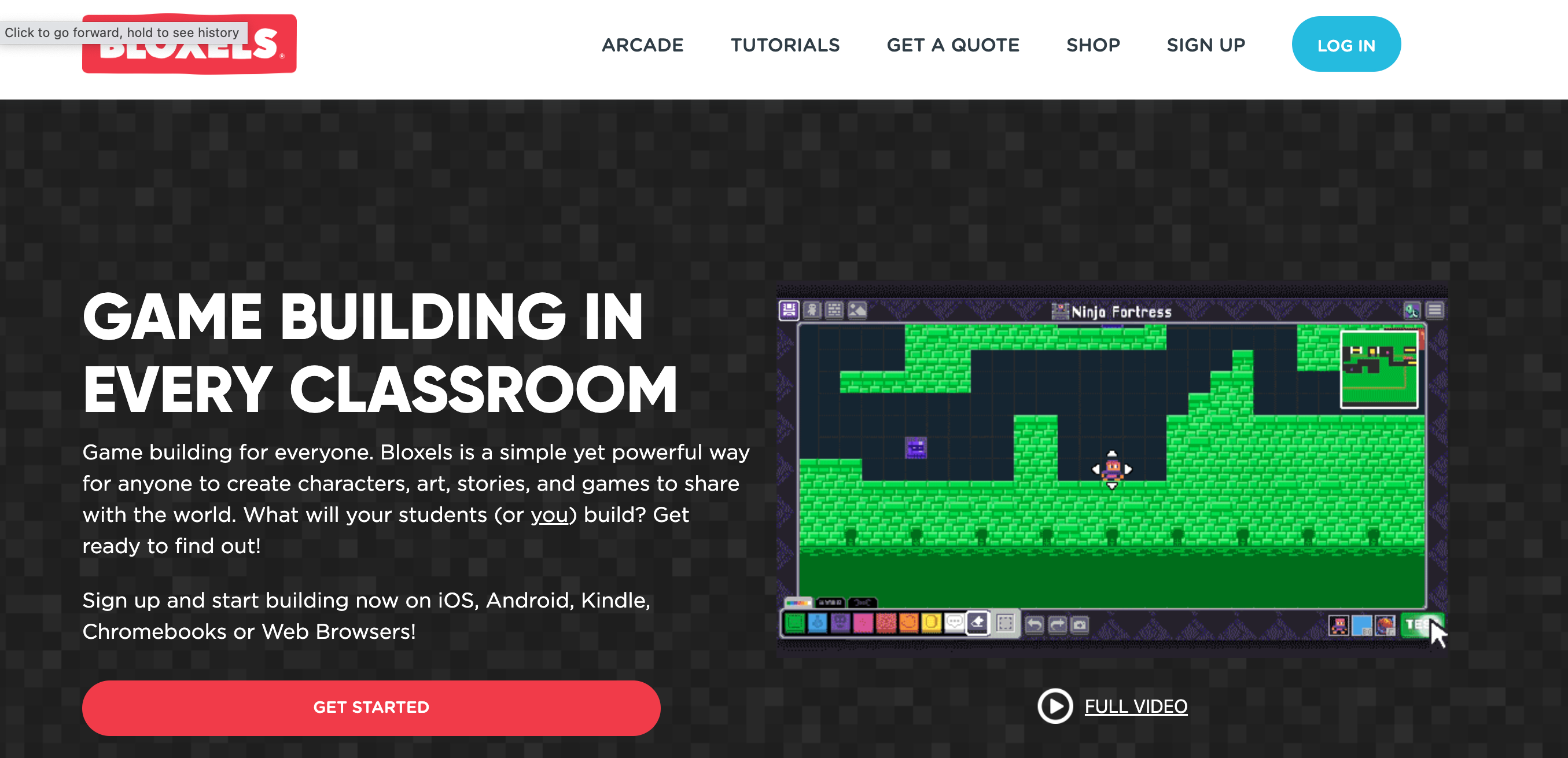
Next, I introduced the app Bloxels. Bloxels is a game building program. The user designs different elements of the game, characters, power ups, villains, etc and allows the user to program the different elements with different features, like powers and lives. The program also uses color blocks for the code. The student is able to place the color coded blocks in the game to program where ground, water, hazards, power ups, villains are in game. The color coded blocks make this video game design program accessible for younger students, they are able to program and code the games following the color system so it is a perfect tool for emerging readers to feel successful in game and coding design producing a fun and impressive game to play.


The students spent several class sessions making their game elements in Bloxels and then coding and building the game in the program. The students connected the coding with their design elements and then tested and had other students test their games. They made different edits to the game based on feedback making sure that all the elements of their game worked, that their game was fun and challenging. (Learner III.C.1)


The final step was to publish the games and have a big gaming day. Students used the feedback I like, I wish, I wonder. After they play a classmate game, the student knows what they like about the game, what they wished they had changed about the game and what they wonder could be added to the game. This feedback routine helps students to expand on their feedback beyond “I liked it, it was fun” and also stays positive by sharing what they liked first and gives suggestions for changes as well as for advancing the game.  (Learner III.C.1)


This was a great project that connected literacy skills and terms that students work in the classroom, connected with coding, design and technology and wrapped it all up in video gaming, something that the students love! They had so much fun with their project and were so proud of the games they created!


Thursday, March 24, 2022

Third Grade Cardboard Arcade Extravaganza: Collaboration & Cardboard a Perfect Combination

 When I start planning for projects with my students in the library, my first step is to check in with the classroom teachers and ask about themes, topics and ideas they are looking at in their curriculum. The third grade curriculum focuses on the history of Chicago. Over the years I have created different projects that connected with the curriculum that was happening in the classrooms. (School Library III.A.1) This year I wanted to create a project that would connect with their classroom curriculum but was also a collaborative, hands-on building project. The last couple years of Covid restrictions have limited the collaborative projects I have been able to do in the library. As I was thinking about this project I remember a previous project that I did about the 1893 World’s Fair in Chicago and the Ferris Wheel, one of the highlights of the fair. This sparked an idea about innovation and other famous firsts that started in the City of Chicago. This led to the Third Grade Cardboard Arcade Extravaganza!


Students started with reading the book Mr. Ferris and His Wheel, the story of the first Ferris Wheel ever built, and one of the biggest attractions at the 1893 Chicago’s World Fair. Students then learned about some of the other amazing innovations in Chicago’s history, everything from car radio to Roller Derby and mobile phones to the first brownie recipe. Third graders also learned that at one time in history, Chicago was the pinball machine capital of the world with all the games made and manufactured here in the city. I shared the story of  Caine’s Arcade, the viral video from 2012 that tells the story of a nine year old who built his own cardboard arcade. Then I shared their challenge, design and build their own cardboard arcade games.


This project was a connection with Chicago history and innovation in Chicago but the main goal and focus was on collaboration. I wanted to give my third graders an opportunity to focus on how they work with each other and remind them of those skills and get back into the collaboration mindset, something that was rusty since Covid mitigations limited student interaction. One of the main goals was to have students establish group norms before they got started designing so that they could learn to be better collaborators. The very first step when they were placed in their groups was to create their group norms for how they would agree on their design and material choices, how to manage disagreements and how to handle job assignments. After each group set their norms, we were ready to move to the design step. (Learner III.B.2, Learner III.D.1)


One of the first activities groups did was brainstorming and sorting. Students started by brainstorming ideas for arcade games they could make out of cardboard. Each student had a set of post it notes, I set a timer and students started writing down all of the games they could think of to make with cardboard. Some of the games were based on games at the arcade or ones they saw in Cain’s Arcade and some of the games were ones they made up. Students could write down names or draw pictures of their games. Next, they did a silent sort of their ideas, placing and moving their ideas into piles of similar game ideas. This allowed the teams to narrow down their ideas to about 3-4 game ideas. Students then talked and compromised to pick a final idea. Some of the groups decided right away noticing that they had the most post it notes in one type of game, some had to talk things through and compromise by taking parts from different games and combining them to make their own new game. (Learner III.C.1, Learner III.B.1, Learner III.A.2)


Teams worked together to decide on their game and then sketched out their design ideas, including what materials they would build with, the rules and instructions for their game and tickets, and prizes for players. Students in their teams also focused on working together to assign different jobs so that they could complete their cardboard arcades in the timeline that we had.


Then they started building! Using materials in the TIDES Garage, including lots and lots of cardboard from the cardboard closet, duct tape, plastic wrap, hooks, battery timers, pipe cleaners and more, they built their prototypes. Throughout the process, third graders tested their games, and made changes and adjustments to make sure they worked. They created signage for their games with instructions, and created ticket dispensers and prize bins. Teams tested their games by asking fellow classmates to read their instructions and test the games to make sure other third graders would be able to play the games. ( Learner, III.A.3, Learner III.C.1)


After every team finalized their games and added decorations, it was time for the Third Grade Cardboard Arcade Extravaganza!


The whole third grade gathered in the library to spend time playing all the amazing cardboard games that they built! Students and teachers had a great time playing games, collecting tickets and winning prizes. It was a fun way to celebrate the collaboration and design process the third graders engaged in to make some really cool arcade games!

Friday, November 19, 2021

Collaboration, Cooperation, Coding connected with Gaming

 A couple of years ago I came across this post by Colleen Graves on Instructables “Collaborative Makey Makey Sensory Maze.” It was such a cool project and it inspired me to make a collaborative Makey Makey maze for my kindergarten students for a solar system unit we were doing. I shared that project in a previous post: Coding, MakeyMakey and a Field Trip Around the Solar System. This project was so much fun to make and included the kindergarteners' voices and recordings with facts about what they learned about the different planets during our research but the coding and the building of the map was done by me and not by the students. I have always wanted to do a project where the students were the ones to code, design and build an interactive conductive board with Makey Makey, this year I had the chance with my fifth grade students.

For this project, fifth graders were challenged to work in collaborative groups and design, code and build cooperative, interactive video games. Students worked in design teams using different conductive materials and technology tools to create their interactive games.  Their game needed to be a cooperative game, two players that needed to work together to win the game.

The project started with introducing students, or reintroducing some students, to the Scratch coding program. Scratch is a free online coding program designed at MIT’s Media Lab. Scratch coding is a way for students to learn the coding language, as well as learning how to design, solve problems, iterate, share their work and amplify their voice.

Fifth graders explored the different code blocks, characters and background options. They also spent time playing games created with Scratch and shared to the Scratch site by students from around the world. This helped spark ideas about games that they could make themselves and allowed them to explore the code they would need to make their games. Scratch is a wonderful tool to use when integrating the Shared Foundation of Collaborate into the learning experience. When exploring the resources in Scratch “Learners participate in personal, social, and intellectual networks by: using a variety of communication tools and resources (Learner III.B.1) and establishing connections with other learners to build on their own prior knowledge and create new knowledge.” (Learner III.B.2) Fifth graders connected and explored the work of other learners from around the world on the Scratch Explore page, seeing what students were able to build and because Scratch is an open sourced coding platform, use some of the code that other students created. They also were able to build on the knowledge they had about coding, learn new coding techniques and build new code to share in the games.

Next students were put into their game building groups. Groups had a brainstorming session where they came up with ideas about what type of game they wanted to create; a maze, avoidance, where the players had to move to avoid an object, or a collect game, where players needed to collect objects in the game, or a combination of these different types of games. They also need a theme of the game and to design their game board. Then each group decided who would do each job in their game design and building. Some students focused on the coding, they would create and test all the code to make their game design work. Game board builders focused on wiring and building their interactive game boards using conductive materials and the Makey Makey. Finally the designer worked on the theme of their game, including background, characters, art and design of the game board. The group brainstorming and planning process focused on “Learners working productively with others to solve problems by: soliciting and responding to feedback from others” (Learner III.C.1). Fifth graders needed to listen to each other, give feedback and discuss options and come to a consensus on their game. They also needed to decide who was going to take on each of the roles to ensure that their games could be completed in the time allotted.


Now that each team had their design, theme, and plan set, they got to building their games! The coders worked on coding the games to work. When they were challenged with a code they couldn’t figure out how to execute, they talked with fellow classmates, searched the Scratch website for similar games to look at their code and searched Scratch message boards for advice. Through this iterative process, learners “actively contribute to group discussions” (Learner III.D.1) and fifth graders identify collaborative opportunities by: “deciding to solve problems informed by group interaction” (Learner III.A.3).

The game board designers worked with a variety of materials to make a large game board that would lay on the floor that players activated with their feet. They used conductive materials like copper sheets and conductive HVAC tape that were connected to wires that students cut and stripped and connected to a Makey Makey. A Makey Makey is an external plug and play circuit board that allows conductive materials to connect with a computer and coding that when triggered the circuit is completed and the code is triggered in the Scratch game. The game boards were triggered when the conducted materials were stepped on and connected to the instructions in the code. The game board designers tested and retested as they added the different layers of their game boards to ensure their buttons were working at each stage of the building process.


The designers were coordinating and working with each of the groups. They were working with the coders to find background images, characters, villains and objects for the players to collect in the game. They were also working with the game board builders to make sure the layout of the game boards worked and that the designs and illustrations added to the game boards fit with the theme of the game.

The fifth graders recognized throughout this process that they would not have been able to complete this on their own. They needed each other to share the building, coding and wiring. They also needed each other to talk through challenges and ideas as they were building their code, wiring and testing their boards and connecting all the pieces together to make a working interactive game board. Learners “recognized learning as a social responsibility” (Learner III.D.2).

After several sessions of building, coding, wiring, testing, editing and rethinking their game plans all their games were complete and it was time for game day share out! Each of the laptops with the Scratch program and game was projected onto one of the screens, connected their boards and students had a blast playing each others’ games!


Sunday, October 24, 2021

Books and 3D Printing: the Library Book Recommendation Vending Machine

 So much of the collaboration that I engage in is with co-teachers at my school or with and among my students but one of the best sources for sharing ideas and collaborating with fellow educators, for me, has been on social media, especially Twitter. I have followed so many great educators and creative people that also spark new ideas for books, projects, additions to the library space and more. I believe this is another way the “School library provides opportunities for school librarians to connect and work with the learning community by: Facilitating diverse social and intellectual learner networks” (School Library III.C.1). This summer I came across a post from a makerspace teacher that sparked an idea for a great start of the year book, design and technology project for my fourth graders, a toy vending machine!

I have followed @designmaketeach on twitter for years and have been inspired by a lot of the projects he does with his high school students in the school makerspace. Over the summer I came across this tweet:


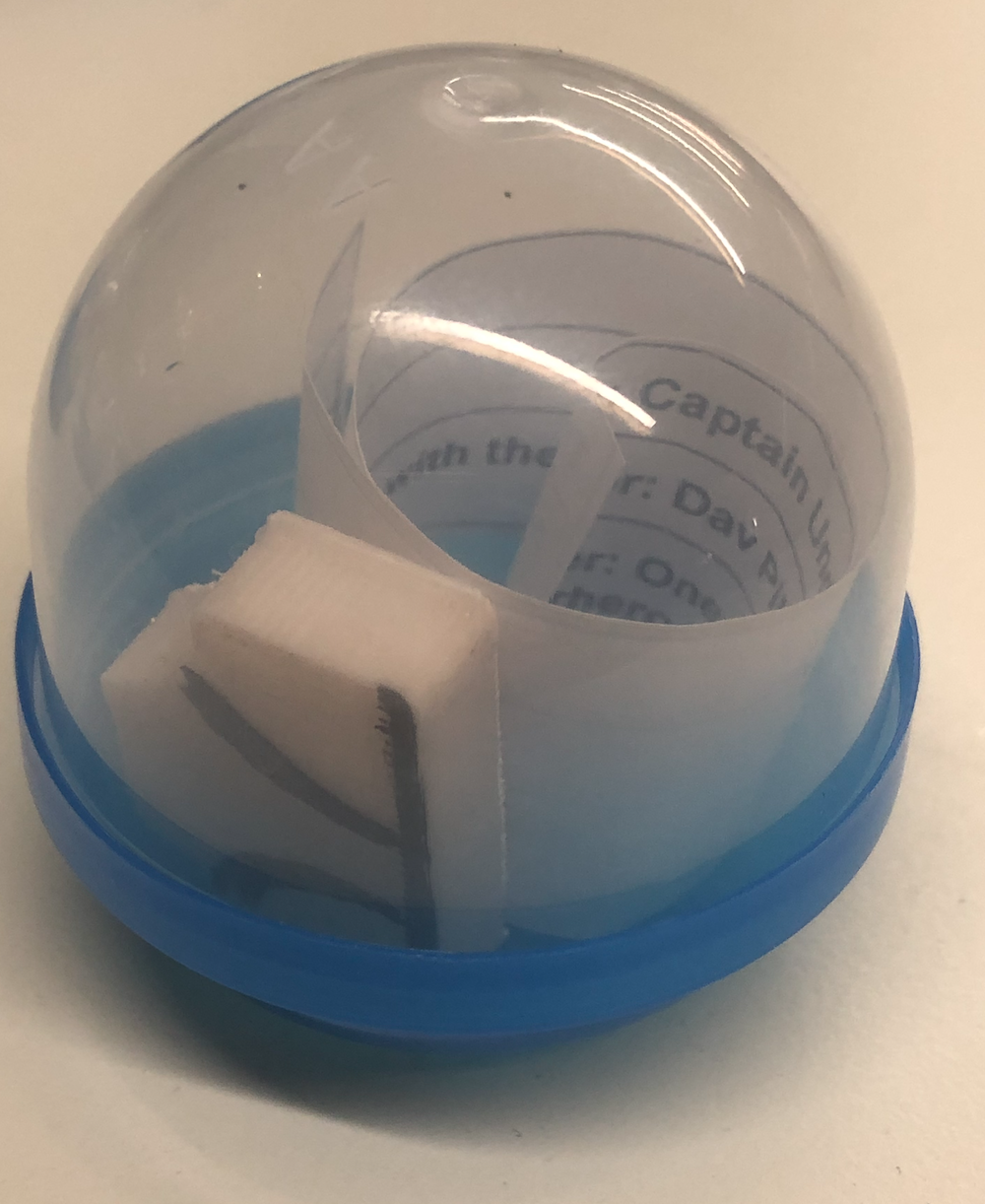
I loved these machines as a kid! The excitement of twisting the dial to see what toy, stickers, or cool bouncing ball you would get. This sparked an idea, what if fourth graders designed small 3D prints that would go in the machine with a book review for our third graders. I decided to give it a try and have this be the first project of the school year for my fourth grade students. I was able to purchase the machine and the acorn containers that hold the small toys. I chose the machine that did not need a quarter or token to get a toy. We were all set to start the project.

Fourth graders started by thinking about a book that they loved to read in third grade and thought our current third graders would like too. Students shared with each other and talked about what books would be great recommendations for third graders. This process was a way for students to discuss books with each other and also think about what they would like to share with fellow learners. Students were “actively contributing to group discussions” (Learner III.D.1).

Students then wrote out a description of the book and then crafted a two to three sentence teaser about the story to get a third grader excited to read the book, the thought of it like a short commercial. We shared an assignment through Google Classroom with a template for the book slips that would go in the acorn containers. Students included the title, author and call number of the book. We did some editing and revisions on the teaser slips and the students were ready to move to the next step of the project.

Next came the challenge, fourth graders needed to design an object that was connected to the book. They sketched out their ideas and planned their designs. Some designs included beanstalk from the Land of Stories, a hamburger from Stick Dog, and more.

Then we did a refresher tutorial on how to use Tinkercad, our online 3D design software. Students worked on using the shapes and items in the software library to build and make their designs. We also focused on measurements. Students measured their designs using the tools in the software and then measured the acorn containers that their objects would need to fit into. Then fourth graders started designing and working on their 3D objects. They were creative using the shapes in the library and then adjusting and re-adjusting their objects to make sure their measurements were correct. After the designs were completed, students uploaded their files to the library website to be 3D printed.


Next came the test, did their prints come out the way they wanted and could they fit into the vending machine acorns? Some prints worked, some were too small and some were too big, others had to make adjustments to parts or pieces of their designs. Back to the design process and another iteration of their 3D prints, students made adjustments to their 3D files, resubmitted them and printed the designs.

Once the prints were the correct size and design the fourth graders wanted, they added color details to their designs with markers, printed out their book commercial slips and assembled their vending machine acorns.


The book recommendations and 3D printed objects were added to the library book recommendation machine ready to spread the word about some awesome books for third graders. The project was a great success, fourth graders were thoughtful about their book recommendations and spent time learning more about the 3D design process. They also went through the iterative process, printing out their designs and making changes if the print did not work. Fourth graders learned that design is a process and it might not be successful the first time. It has also been wonderful to see the third graders so excited about the machine, looking at the book recommendation and making a connection with the 3D print and learning about some new books.


Wednesday, June 23, 2021

First Graders learn and work together to build a healthy city ecosystem!

This school year has been challenging for so many reasons. With the global pandemic there has been remote learning, hybrid learning and in person learning with precautions like students six feet apart, masked and no shared materials. It has been a challenge to design projects that are hands-on and collaborative for students with all of the restrictions. The first graders study the idea of community, their school and neighborhood communities and our Chicago city community. The Covid pandemic has also brought to our attention the inequity in our cities, towns and communities.

I spent time thinking and planning a project that would connect with the study of community. I also wanted to incorporate some hands-on building and a way for students to be collaborative. As I started to think about the last year and make connections with the topic of communities and think about the designing and redesigning process, the idea of rethinking our city and community started to form and this reminded me of a wonderful picture book biography I had purchased for the school library a few years back, Walking in the City With Jane: The Story of Jane Jacobs. Jacobs poses the question “What does a city need to be a healthy ecosystem?” This was the big question first graders tackled for this project!


Students started with reading the book Walking In the City With Jane: The Story of Jane Jacobs  by Susan Huges. The story shares the life of Jane Jacobs, an urban thinker and activist. Jacobs believed that cities were amazing places to live and that they should be ecosystems designed for all people. Students talked about what the parts of an ecosystem are, the living and nonliving things. Then in small groups students explored other books including The Curious Garden about the Highline in New York and the 606 in Chicago. Some groups read the book The Secret Subway, the story of the origins of the NYC subway system. Students made connections with the idea that building a train underground was originally thought to be an impossible idea and that sometimes ideas that seem impossible end up being ideas that work. Students also explored books about bridges around the world, free little libraries, wind and solar energy and water systems in cities. Throughout this process students collected information and ideas about what were essential parts of a healthy ecosystem, they were “actively contributing to group discussions” (Learner III D.1) as well as “developing new understanding through engagement in a learning group” (Learner III A.3.)

Next, first graders worked together to think about how they could reimagine and rebuild the city of Chicago as a healthy urban ecosystem. They started by brainstorming what is needed in a healthy city for every person living there to be healthy, happy and safe. Students shared ideas about housing, transportation, water, green spaces, food, stores, places to work, exercise and entertainment spaces. They also talked about how to use green energy like solar panels and wind energy to take better care of the earth. First graders brainstormed ways to make sure everyone has a place to live, food to eat and transportation. We used Jamboard to collect student ideas and connections, using this collaborative tool allowed students to see each other's ideas, make connections and build on them to come up with an extensive list of ideas on how to build a better future city of Chicago. This was a way of “establishing connections with other learners to build on their prior knowledge” with these new ideas students were able to add to their understanding and their design plans “creating new knowledge” (Learner III B.2.)


Then first graders were given the challenge to design and build their neighborhood in the future of the city of Chicago. Students drew out plans for their neighborhood ecosystem. With their ideas down on paper, first graders were ready to start prototyping their neighborhood ecosystems. The library team put together a maker cart full of building materials including different cardboard shapes with connectors to make buildings and structures, pipe cleaners, puff balls, different colored construction paper and tissue paper, feathers, foam shapes, and more. First graders started building! They built roads and waterways, future transportation systems, gardens on top of buildings, amazing playgrounds and houses, farmers markets and robots that deliver food to everyone. Students were creative in the materials they used and the designs they created. First Graders also worked with classmates to connect their neighborhoods together.


Finally, first graders made videos explaining their neighborhoods, what they built and why their designs were a healthy, happy and safe ecosystem for everyone. All of the neighborhoods were placed together in the library to create a giant 1st grade prototype of the future City of Chicago, a website was created to share the videos, photos and the project and a bulletin board was created outside the first grade classrooms. Students were so creative and thoughtful as they designed a space that is a wonderful future ecosystem for our city. Throughout this project students used a variety of resources including books, web searches, online databases and each other to learn more about healthy city ecosystems. They designed and then built their prototypes using a variety of materials to make their ideas and designs come to life. Finally they recorded videos and images to contribute to a collaborative website to share their projects with the whole community. Through this project the school library “modeled the use of a variety of communication tools and resources” (School Libraries III B.1.) Also giving students the opportunities to brainstorm, share ideas, talk about their designs and share, the school library illustrated how to “cultivate networks that allow learners to build on their own prior knowledge and create new knowledge” (School Library III B.2.)